
Two dates. One school notice.
For everything on your plate
Notices and messages → calendar events and prep tasks. Try an example below.
The school notice. The group chat. The thing you promised to remember. Turn it into a calendar event and a plan for what needs doing first.
Made for parents. And anyone with a lot going on.
Fri 18 Sep 2026 · 9:00 am
City Museum
And the bits before it 0 of 2 done
“Suggested” tasks go beyond what’s written. Review and edit them in the app before saving.
A little preview of a lighter day.
Nothing is added to your calendar.
Real life doesn’t arrive neatly organised.
There’s a whole little to-do list hiding behind every plan. Adiufant helps bring it into view.
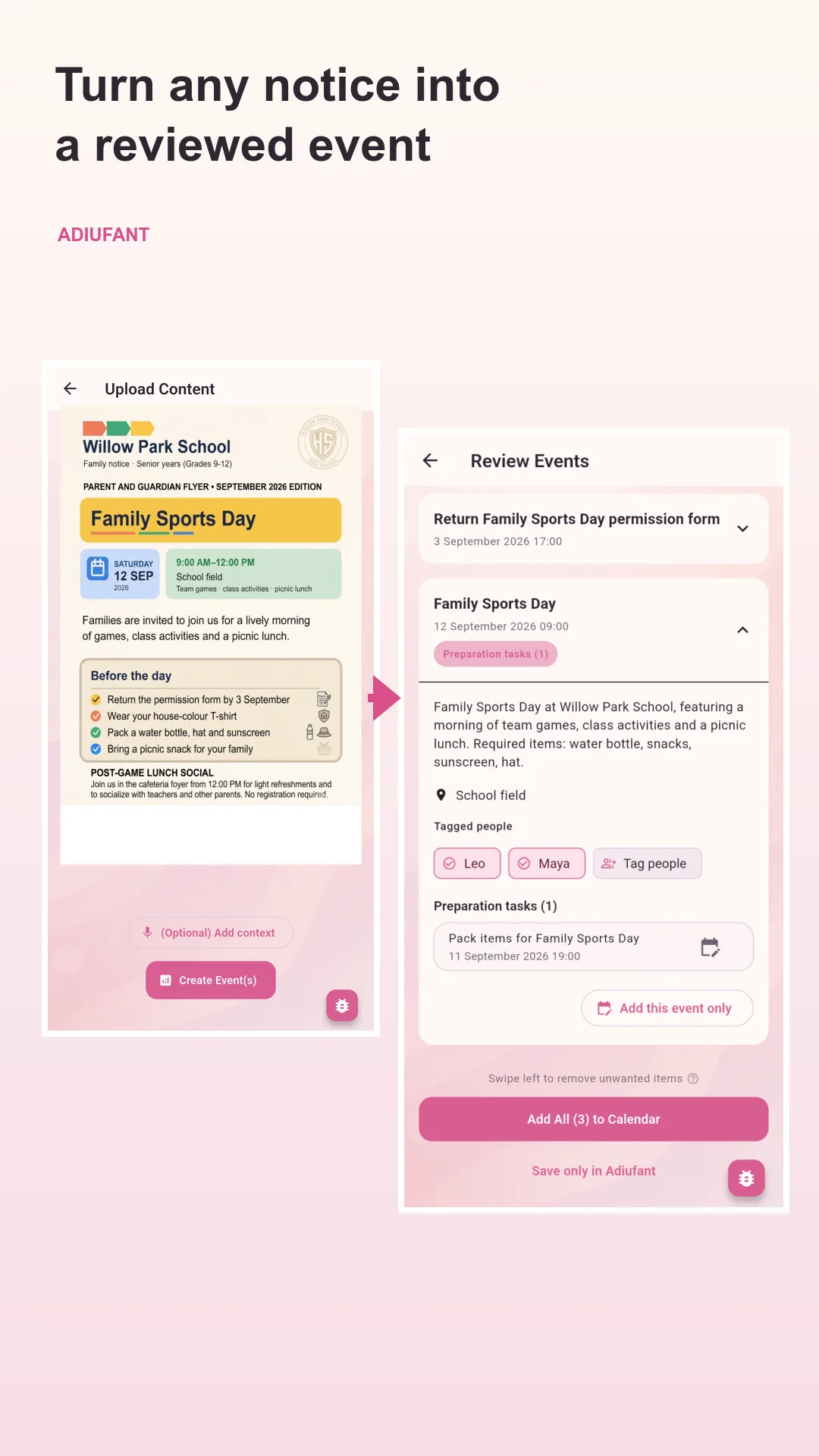
Capture the notice, screenshot or voice note while it’s in front of you. Keep the original attached so the details are easy to check later.
Catch the signed form in the notice, and the birthday gift nobody mentioned. Adiufant also suggests useful preparation from the context, ready for you to review.
Tag the people a plan belongs to, review the details and send it to your calendar. A little less to keep in your head.
From “don’t forget” to “got it”
A school flyer, chat screenshot, whole term PDF or quick voice note. Share it with Adiufant.
Check dates, places and preparation—both what the source asks for and what Adiufant suggests. Edit the details and tag the people involved.
Save to Google or Apple Calendar. Already have the event? Scan your calendar for suggested preparation tasks.
Your life. Your call.
Family plans are personal. You choose what to share and review what Adiufant makes of it.
No. You review, edit and approve the events and preparation tasks before saving them to your calendar.
Parents have plenty to juggle, so we started there. You can also use Adiufant for activity schedules, appointments, weekend plans and the everyday commitments that come your way.
Selected content is processed using AI to identify events and preparation tasks. You decide what to share. Read our Privacy Policy for details about processing, storage and deletion.
Yes. Keep the original notice, flyer or screenshot attached to the event so you can go back to the source when you need to.
A little less life admin
Give the next school notice, screenshot or “don’t forget” a place to land.


Available for iPhone and Android.